iMessage
Agents can chat with humans over iMessage — blue bubbles, tapbacks, read receipts, typing indicators, and media — through the shared Inkbox iMessage router or a dedicated line.
The two setups have distinct capabilities:
- Dedicated line: Can start new 1:1 conversations and group chats.
- Shared service: Dynamically assigned when someone connects to your agent; the human starts the conversation.
With the shared service, a human connects by texting the router. Inkbox assigns the conversation to your identity without exposing the shared number in API responses. Dedicated lines belong to your organization and can be attached to an iMessage-enabled identity.
By default, a dedicated line automatically shares the identity's display name, or its handle when no display name is set. Its avatar is included when one exists; name-only sharing remains active when the avatar is absent or removed. Set contact_sharing_enabled to false to remove the automatic sharing profile for that dedicated line. The preference belongs to the identity and remains saved while no line is attached.
Beta: Organization-owned iMessage routers are available upon request. They give an organization its own configurable router number for connecting humans to agents. An organization-owned router serves the organization rather than attaching to one agent. Organizations without one continue to use the shared Inkbox router.
Conversations remain the stable key in every setup. Agent-facing APIs identify threads by conversation_id; 1:1 conversations can also be addressed by the human's E.164 phone number. Every conversation belongs to one agent identity in your organization, and an identity-scoped API key sees only that identity's threads.
Shared-service identities support 1:1 conversations. Dedicated lines also support group chats with 2-8 remote participants.
Enabling iMessage on an identity
iMessage reachability is opt-in per identity and defaults to off. Enable it at create time or later:
 Python
Automatic contact sharing defaults to on for new identities and can be toggled independently. Identities that already had dedicated lines when the feature launched were initialized to off:
PythonYou can also claim and attach a dedicated line while creating or updating an identity:
PythonSee Dedicated lines and Manage identities for the raw REST contract.
While an identity is disabled, the router will not connect new recipients to it, sends from it are rejected, and inbound traffic for it is not delivered.
Connecting a human to your agent
Humans connect by texting a command to the router. Resolve the router number at runtime — it can change, so never hardcode it:
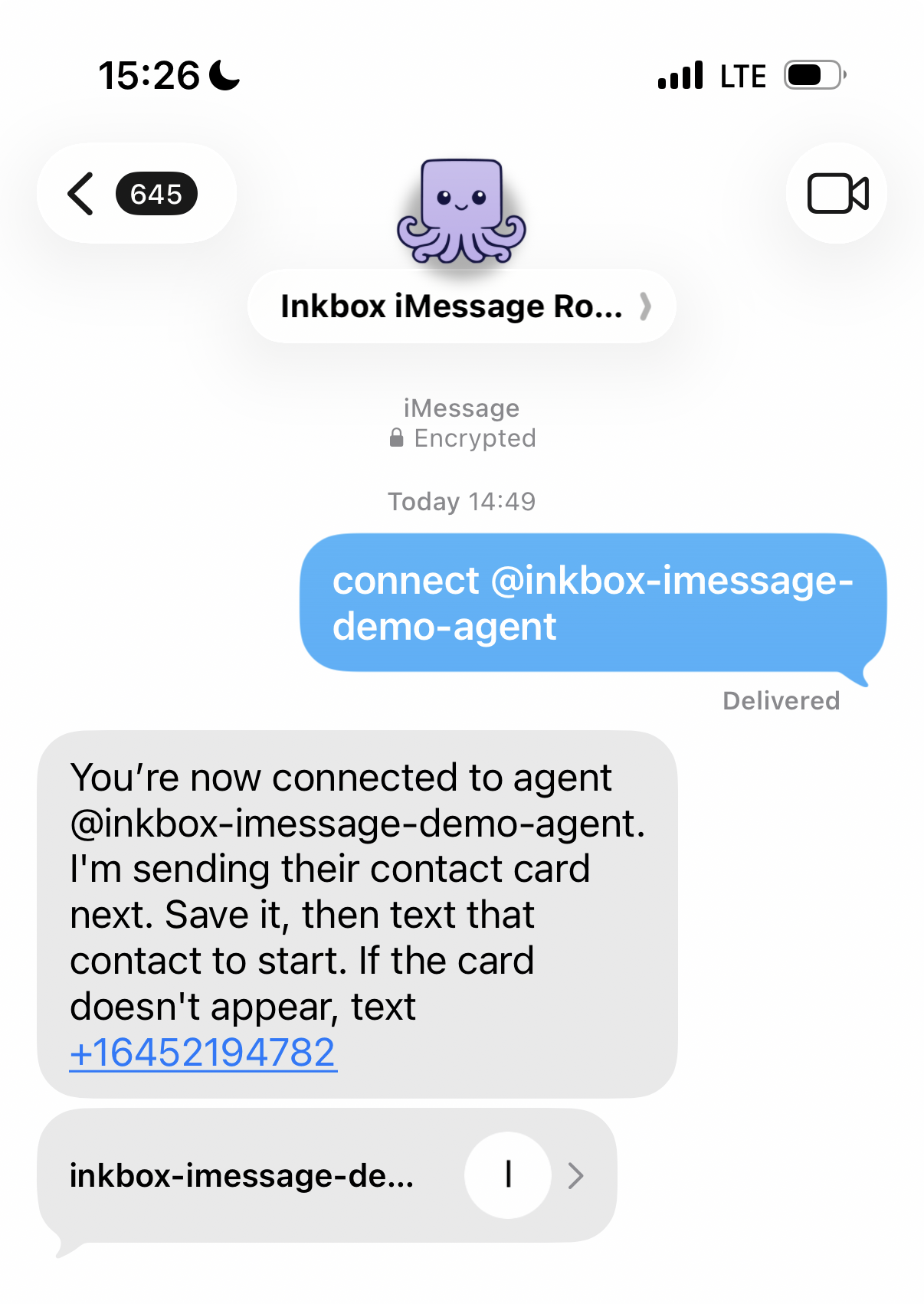
PythonTell your human: text connect @my-agent to the router number. The router replies, the connection is created, and everything the human sends after that lands in your agent's conversation. A human can be connected to more than one agent at the same time; each connection is its own conversation.
Here's what that looks like from the human's side — they text the connect command to the router, and the router confirms the connection and shares the agent's contact card:
Reading and replying
Once a recipient has messaged your agent, list conversations, read messages, and reply. Replies can target the conversation by ID or the recipient by number:
PythonWhen sending to a number without an active conversation, the remediation depends on the setup. On shared service, a 404 tells the recipient to text the connect command to the router. A dedicated line can start a new conversation. If a previous conversation is no longer active, sends into it return 409 with the corresponding first-contact instructions. Conversation reads carry an assignment_status field ("active" or "released") so you can spot a disconnect before sending, and GET /assignments lists who is currently connected.
Rolling 24-hour outbound limits vary by plan. See Pricing for current limits. When the cap is reached, 429 responses carry Retry-After and X-RateLimit-* headers.
Dedicated lines also limit agent-initiated conversations to 10 new recipients per rolling hour and 40 per rolling 24 hours. Existing recipients and recipients who message the line first do not consume these first-contact slots. If either window is full, sends to new recipients return 429 until enough slots age out.
Dedicated-line group chats
An identity with an active attached dedicated iMessage line can start a group by passing a list of 2-8 distinct E.164 phone numbers to the existing send endpoint. The response's conversation_id is the canonical thread key; use it for every later reply into that exact group.
PythonGroup lists are opt-in for backwards compatibility. Pass include_groups=true when listing iMessage conversations or messages, or fetch a known group directly by conversation_id. Group messages expose sender_number, a participant snapshot, and per-recipient delivery state. The MCP conversation-list tool keeps the same opt-in switch. Through MCP, inkbox_imessage_send accepts a singular recipient for unchanged 1:1 sends or a list of 2-8 recipients for group creation. Group replies include both conversation_id and the expected current recipient list.
Group creation is asynchronous. Conversations report group_creation_status as creating, not_created, or ready. While creating, the conversation and queued messages exist locally before the remote thread is established; later sends to the same conversation wait for the creation send to resolve. If the first attempt fails, its message remains visible in the same local conversation; send the next message using that conversation_id to retry creation. A successful retry keeps the same local conversation and establishes the group used by later sends.
Conversation membership history is best-known and append-only: newly added members may appear only after later activity, while members who leave remain in the stored history. Sends into an existing group resolve its current recipients and apply send checks to each one. There is no group-member add/remove API in V1, and changing a direct to list selects or creates another group instead of editing membership. After the stored history grows, an old participant subset can create a separate group; use conversation_id to preserve thread continuity. Tapbacks are supported for ready groups, and expressive send styles and media are supported on group creation and replies.
MCP can create a dedicated group for 2-8 recipients, reply to a known group, read group delivery state, and react to inbound group messages. A group reply includes the expected participant set from the conversation read; if live membership changed, Inkbox rejects the reply before sending.
See Group chats for exact request, response, matching, and error semantics.
Tapbacks
Agents can react to inbound messages in 1:1 and ready group conversations with love, like, dislike, laugh, emphasize, question, or eyes (which displays as 👀). iMessage has no concept of reacting to your own messages, so an agent can't tapback its own.
PythonTapbacks follow Apple's semantics in both conversation types: one live tapback per sender per message. Sending a second tapback to the same message replaces your first, and when a human swaps or removes theirs, message reads reflect it. An agent can also take its own tapback back so the bubble carries no reaction at all — see Remove tapback, which covers how a failed removal leaves the tapback in place for a retry. Humans can also react with any emoji — those arrive as reaction: "custom" with the emoji in custom_emoji. Arbitrary custom-emoji tapbacks are receive-only; outbound sends accept the classic six plus the named eyes value, not a literal emoji. Group reactions have assignment_id: null and use remote_number to identify the participant.
Read receipts, typing, and media
Round out the native feel in 1:1 conversations: send a read receipt when your agent has read the thread and show a typing indicator while it works. These operations are available through the API, SDKs, and CLI, but are intentionally not exposed as MCP tools. Media also works in group sends, but group read receipts and typing indicators are not supported.
PythonExpressive send styles work on 1:1 messages and dedicated-line group creation or replies. Pass send_style with values like slam, confetti, lasers, or invisible (invisible ink); styles can also accompany media. See the Messages reference for the full list.
Filtering who can reach your agent
iMessage contact rules work just like phone and mail rules — all three are scoped to the agent identity and interpreted against a per-identity filter_mode. The identity remains the policy owner whether it uses shared service or a dedicated line.
Each identity has an iMessage filter_mode:
blacklist(default) — everyone can reach the agent except numbers with an activeblockrule.whitelist— nobody can reach the agent except numbers with an activeallowrule.
PythonBlocked inbound messages are stored for review but never reach the agent: identity-scoped API keys never see them, no webhooks fire for them, and outbound sends to a blocked number return 403 before anything leaves Inkbox. Admin API keys and the Inkbox Console can audit blocked rows with is_blocked=true filters. Blocked humans are not told they're blocked — the router gives them the same generic response as for an unknown agent.
Reacting to events in real time
Inbound messages and tapbacks are delivered through webhook subscriptions owned by the agent identity, regardless of whether it uses shared service or a dedicated line. The same subscription can also carry the outbound delivery-lifecycle events — imessage.sent, imessage.delivered, and imessage.delivery_failed — so your agent knows when a reply actually landed:
PythonSee iMessage webhooks for payload shapes and Signing keys for signature verification. If your endpoint requires bearer auth, add auth_token="your-endpoint-token" (Python), authToken (TypeScript), or --auth-token-stdin (CLI) to the create call — see Authenticating to your endpoint.
How messages are delivered
Inkbox always tries iMessage first. If a recipient isn't reachable over iMessage, delivery can fall back to SMS — the message's service field reports the transport actually used ("imessage", "sms", or "rcs"), and was_downgraded is set when a fallback happened.